> For the complete documentation index, see [llms.txt](https://docs.zenlytic.com/llms.txt). Markdown versions of documentation pages are available by appending `.md` to page URLs; this page is available as [Markdown](https://docs.zenlytic.com/getting-started/how-zoe-works.md).
# How Zoë Works
How Zoë answers data questions end to end — the agentic loop, the tools behind each answer, and how every query stays governed and auditable.
Zoë answers data questions by writing and running SQL against your warehouse in real time. Every query is grounded in **governed, verified field definitions** from your semantic model rather than free-form generation, so answers stay accurate, auditable, and consistent. The output isn't just numbers — you can also get rich documents, spreadsheets, presentations, and interactive dashboards, delivered as [Artifacts](/using-zenlytic/artifacts.md).
Dashboards, charts, and other HTML Artifacts don't store the numbers Zoë pulled. They use [Live Queries](/using-zenlytic/artifacts.md#live-queries): they store the queries and re-run them through the same permission-enforced path every time someone opens the artifact, so the data is current and scoped to whoever is looking at it.
This page walks through the architecture: the agentic loop that runs on every question, the tools available at each step, and why the result is trustworthy.
## The agentic loop
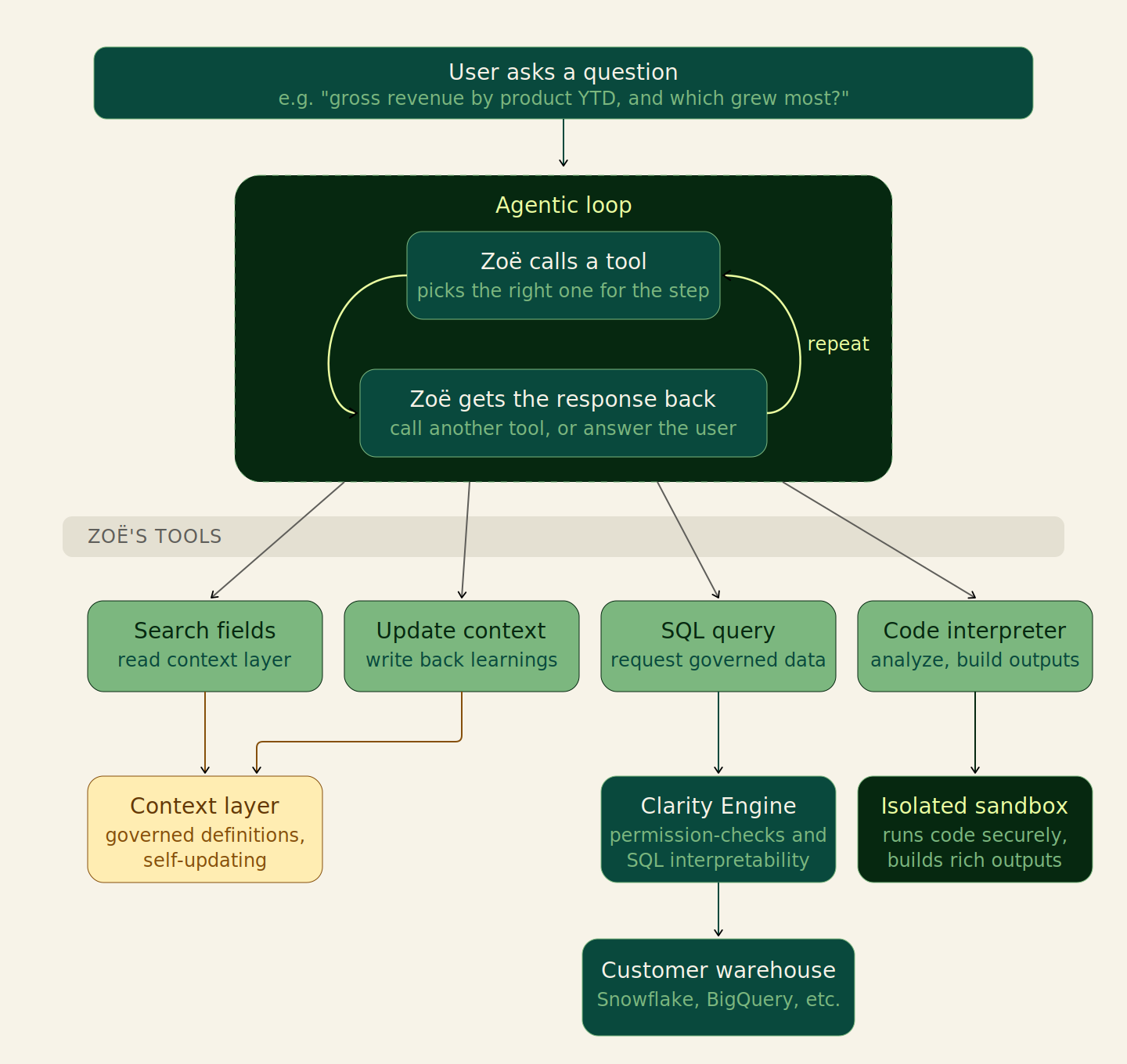
Zoë operates with an **agentic architecture**. Each step of answering a question is a choice: call a tool from the toolset, or respond directly to the user.
When Zoë calls a tool, Zenlytic runs the tool and returns the result. That result informs the next decision — call another tool, or respond. The loop continues until Zoë responds directly.
Zoë's end-to-end question-answering architecture. The agentic loop runs until Zoë decides to respond directly.
Three things keep this loop trustworthy:
* **Field definitions are governed.** Every measure, dimension, and join Zoë uses comes from your semantic model — the **Context layer** — not from improvisation.
* **SQL goes through the** [**Clarity Engine**](/using-zenlytic/clarity_engine.md)**.** Every query Zoë writes is validated against your model and your row- and column-level security rules before it ever reaches the warehouse.
* **Every step is visible.** You can see which tools Zoë called, the SQL that ran, and the fields referenced. Citations on the output link back to the underlying definitions.
## Zoë's tools
The toolset Zoë chooses from on every step. The four shown in the diagram cover most question-answering work:
* **`search fields`** — reads the Context layer to find measures, dimensions, and joins relevant to the question. Returns SQL definitions and metadata so Zoë can build a correct query rather than guess at field names.
* **`update context`** — writes back to the Context layer. When Zoë learns something new — a better synonym, a clearer description, a new measure that should exist — this tool can save the learning so future questions benefit. See [Ask Zoë for Data Model Recommendations](/data-modeling/asking-zoe-for-recommendations.md) for the user-facing workflow this powers.
* **`sql query`** — sends a SQL request to the warehouse. The query is routed through the [Clarity Engine](/using-zenlytic/clarity_engine.md), which enforces permissions and validates against the semantic model before execution.
* **`code interpreter`** — runs Python in an isolated sandbox. This is what builds the rich, interactive outputs that get delivered to you as [Artifacts](/using-zenlytic/artifacts.md) (dashboards, documents, spreadsheets, presentations).
Other tools exist for searching workspace content, web search, and similar — but the four above are the load-bearing ones for analytical questions.
### The Context layer is self-updating
The Context layer holds your governed field definitions, descriptions, synonyms, skills, and system prompt rules. It's read by `search fields` on every question and written to by `update context` when Zoë (with permission) saves a learning. Over time the model keeps current with your business without requiring a separate "training" pass.
## A worked example
Take a non-trivial question:
> *"Can you show me gross revenue by product YTD and tell me which product had the highest growth from last YTD to this YTD?"*
Here's the loop Zoë runs end to end:
1. **Zoë reads the question** and starts by finding the relevant fields, calling `search fields` with search terms `"gross revenue"`, `"ytd"`, `"product"`.
2. **The tool returns matches** like `order_lines.total_gross_revenue`, `order_lines.order_date`, and `products.product_title`, along with their metadata and SQL definitions.
3. **Zoë constructs SQL** referencing those field definitions and calls `sql query`.
4. **The Clarity Engine checks the SQL** for permissions, validates it against the semantic model, and produces a step-by-step breakdown so business users can see exactly what was queried.
5. **The query runs** on the customer warehouse (Snowflake, BigQuery, Redshift, etc.) and the result is returned to Zoë.
6. **Zoë decides to visualize the result** and writes Python code that builds an interactive dashboard, then passes the code to `code interpreter`.
7. **The sandbox runs the code** in isolation, builds the rich output, and Zenlytic delivers it to you as an [Artifact](/using-zenlytic/artifacts.md).
8. **Zoë writes a text summary** of the findings, decides the work is done, and responds — ending the loop.
Throughout, you can inspect every tool call, every SQL query, and every field reference. Nothing about Zoë's reasoning is hidden.
## Why this architecture matters
The agentic loop gives Zoë **flexibility** — the freedom to decompose complex questions and pick the right tool for each piece, in any order, as many times as needed. The governance layer keeps the output **grounded** — every answer ties back to definitions your data team has reviewed, and every query passes through the same row- and column-level security rules that govern the rest of the platform. Together they're what make Zoë both useful for ad-hoc analytical questions and safe to deploy across an organization.
## Related
* [Clarity Engine](/using-zenlytic/clarity_engine.md) — the SQL interpretation and validation layer
* [Context Surfaces](/getting-started/context-surfaces.md) — what context Zoë uses and where it lives
* [Ask Zoë for Data Model Recommendations](/data-modeling/asking-zoe-for-recommendations.md) — how to ask Zoë to update the Context layer
* [Artifacts](/using-zenlytic/artifacts.md) — the rich outputs Zoë produces
* [Fixing Zoë's Mistakes](/getting-started/fixing-zoes-mistakes.md) — diagnostic flow when an answer isn't right
---
# Agent Instructions
This documentation is published with GitBook. GitBook is the documentation platform designed so that both humans and AI agents can read, navigate, and reason over technical content effectively. Learn more at gitbook.com.
## Querying This Documentation
If you need additional information that is not directly available in this page, you can query the documentation by asking a question.
Perform an HTTP GET request on the following URL with the `ask` and `goal` query parameters:
```
GET https://docs.zenlytic.com/getting-started/how-zoe-works.md?ask=&goal=
```
`ask` is the immediate question: it should be specific, self-contained, and written in natural language.
`goal` is what the user is ultimately trying to achieve, the reason they need the answer. Sharing it helps GitBook give you a better, more relevant answer. A goal is most helpful when it describes the outcome the user wants rather than restating the question. For example, with `ask=how do I create an API token`, a goal like `automate deployments from our CI pipeline` lets GitBook tailor the answer to that use case.
The response will contain a direct answer to the question and relevant excerpts and sources from the documentation.
Use this mechanism when the answer is not explicitly present in the current page, you need clarification or additional context, or you want to retrieve related documentation sections.